-1.png?width=450&height=150&name=Logo-Square%20(500%20x%20200%20px)-1.png)
.jpg?height=200&name=immigrant%20(2).jpg)
The Canada Groceries and Essentials Benefit, also known as the CGEB, is a new Government of Canada...
Many Canadians may be eligible for government benefits and credits but are not sure where to check them. The Canada Revenue Agency, or CRA, allows individuals to view many benefit programs directly through CRA My Account.
These benefits may include the Canada Child Benefit, GST/HST credit, Canada Groceries and Essentials Benefit, Ontario Trillium Benefit, Disability Tax Credit, and other provincial or federal credits.
This guide explains how to check your benefits online, what each section means, and where to apply if a benefit may be available to you.
.jpg?width=1680&height=945&name=immigrant%20(1).jpg)
1. Sign in to CRA My Account
Start by signing in to CRA My Account. Sign in to your CRA account - Canada.ca
CRA My Account allows individuals to view tax returns, notices of assessment, balances, tax slips, benefits, credits, direct deposit information, and other personal tax information. CRA’s main page for individual tax credits and benefits is available here: Tax credits and benefits for individuals. CRA also notes that individuals generally need to file their taxes every year to receive or continue receiving benefit and credit payments.
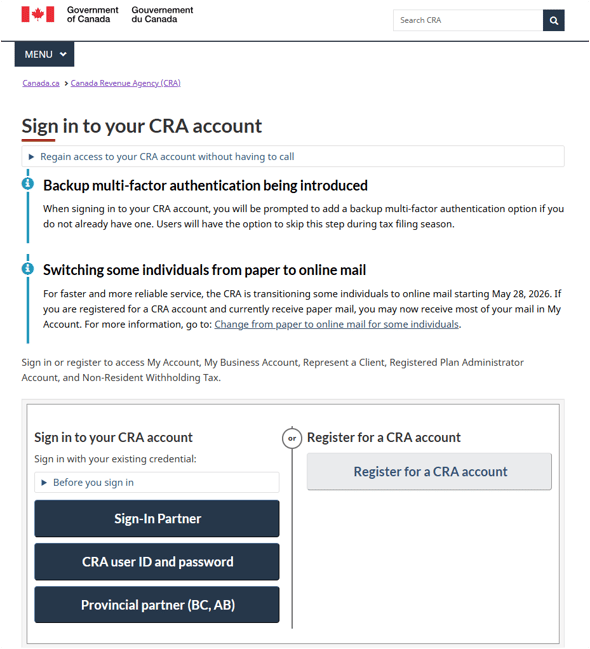
Once you are logged in, look at the left-hand menu and select:
Benefits and credits
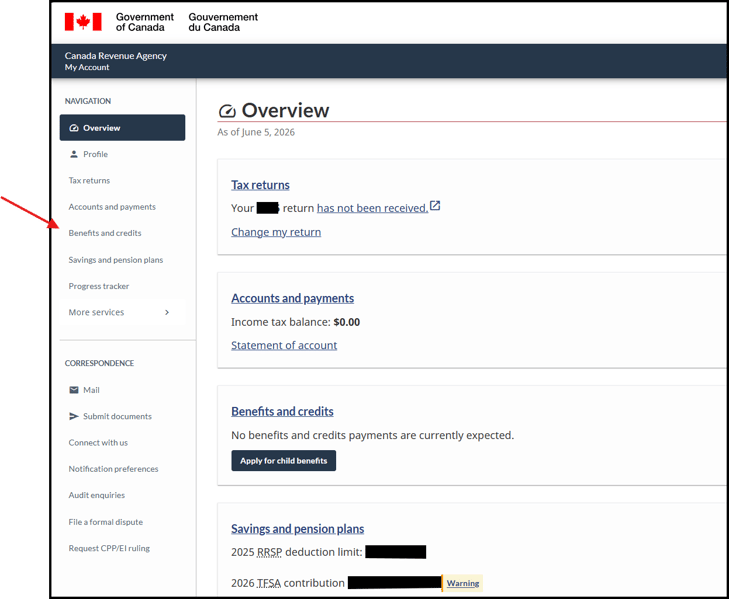
Depending on your situation, you may see sections such as:
- Canada Child Benefit
- Canada Groceries and Essentials Benefit, formerly the GST/HST credit
- Canada Carbon Rebate
- Ontario Trillium Benefit
- Disability Tax Credit
- Child information
- Marital status
- Statement of income
- Payment details
- Statement of account
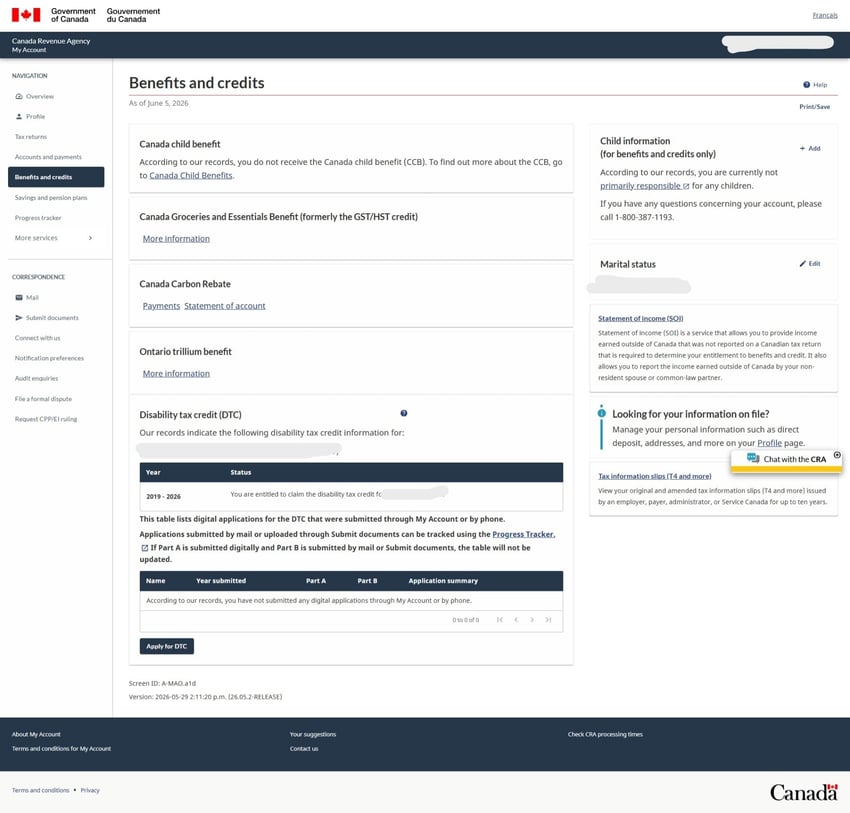
The CRA website may look different for each person depending on their province, income, family status, filing status, and whether they are currently receiving benefits.
2. Review the “Benefits and credits” section
The Benefits and credits section is where CRA shows whether you are receiving certain payments or whether no payments are currently expected.
This section can help you check:
- Whether CRA has children listed on your account
- Whether your marital status is correct
- Whether benefit payments were issued
- Whether a payment was denied or reduced
- Whether CRA has approved a Disability Tax Credit
- Whether there are past payments, adjustments, or overpayments
- Whether a benefit was applied against a CRA balance owing
For official CRA payment dates, you can check CRA’s page here: Payment dates for CRA administered benefits and credits. CRA also warns taxpayers to rely on official government pages because there is false information online about fake benefit payments.
3. Canada Child Benefit, or CCB
The Canada Child Benefit, also called the CCB, is a tax-free monthly payment for eligible families with children under 18. CRA calculates the amount based on your family situation, adjusted family net income, number of children, and children’s ages.
You can read more in our Toro Accounting article here: Canada Child Benefit (CCB).
To check the CCB in CRA My Account:
- Sign in to CRA My Account.
- Go to Benefits and credits.
- Look for Canada Child Benefit.
- Review whether payments are expected.
- Check the Child information section to confirm CRA has the correct child information.
- If a child is missing, select Add and follow CRA’s steps.
CRA explains that the CCB is for eligible families with children under 18 and may also include related provincial or territorial programs.
In many cases, individuals can apply for the CCB directly through CRA My Account. You may need to provide additional documents if CRA requests them, especially if CRA has not previously paid benefits for the child.
4. GST/HST Credit and Canada Groceries and Essentials Benefit
The GST/HST credit is a tax-free quarterly payment for individuals and families with low or modest income. CRA states that individuals are automatically considered for the GST/HST credit when they file their tax return.
Starting in July 2026, the GST/HST credit will be replaced by the Canada Groceries and Essentials Benefit, also called the CGEB. CRA says the eligibility, calculation, and payment structure will remain the same as the GST/HST credit, but payment amounts will increase by 25% for five years starting in July 2026.
To check this benefit in CRA My Account:
- Go to Benefits and credits.
- Look for GST/HST credit or Canada Groceries and Essentials Benefit.
- Click Payments.
- Review the payment dates, amounts, and status.
- Click a payment date if CRA provides additional details.
For 2026, CRA lists GST/HST credit payments on January 5 and April 2, and the July 3 and October 5 payments are renamed as Canada Groceries and Essentials Benefit payments.
CRA also issued a one-time GST/HST credit top-up starting June 5, 2026 as part of the transition to the Canada Groceries and Essentials Benefit. CRA states this payment is 50% of the GST/HST credit amount for the July 2025 to June 2026 period, if the person was entitled to the January 2026 payment.
5. Ontario Trillium Benefit, or OTB
For Ontario residents, the Ontario Trillium Benefit, or OTB, combines three Ontario credits:
- Ontario Energy and Property Tax Credit
- Northern Ontario Energy Credit
- Ontario Sales Tax Credit
The Ontario government explains that you only need to be eligible for at least one of the three credits to receive the Ontario Trillium Benefit.
This benefit is often based on information reported on your personal tax return, such as:
- Rent paid
- Property tax paid
- Age
- Income
- Family situation
- Province of residence
To check the Ontario Trillium Benefit in CRA My Account:
- Go to Benefits and credits.
- Look for Ontario Trillium Benefit.
- Review payment amounts and payment dates.
- Check whether the amount is paid monthly or as a lump sum.
- Confirm that your tax return included the correct rent or property tax information.
If you live in Ontario and paid rent or property tax, it is important to make sure this information was properly entered on your tax return.
6. Canada Carbon Rebate
The Canada Carbon Rebate for individuals has ended. CRA states that the final individual Canada Carbon Rebate payment was the April 2025 payment, after the federal fuel charge was removed effective April 1, 2025.
However, some people may still see older Canada Carbon Rebate activity in CRA My Account, especially if CRA issued a previous-year payment or adjusted an older entitlement.
To check your Canada Carbon Rebate history:
- Go to Benefits and credits.
- Select Canada Carbon Rebate.
- Click Payments or Statement of account.
- Review issued payments, underpayments, deposits, or adjustments.
If CRA shows an amount credited and then deposited to your bank account, that usually means CRA calculated the benefit and then paid it by direct deposit or cheque.
7. Disability Tax Credit, or DTC
The Disability Tax Credit, or DTC, is a non-refundable tax credit for people with severe and prolonged impairments. It may also be transferred to an eligible supporting family member in certain situations.
In CRA My Account, you may see a Disability Tax Credit section under Benefits and credits. This area may show whether the DTC has been approved and for which years.
To apply online:
- Go to Benefits and credits.
- Find Disability Tax Credit.
- Select Apply for DTC.
- Complete Part A.
- Give the medical practitioner the instructions or reference number for Part B.
- Submit and monitor the status through CRA.
CRA’s DTC page explains that the process generally involves an application certified by a medical practitioner, and once approved, the disability amount can be claimed on the tax return.
8. Check payment details and statements of account
For many benefits, CRA allows you to click into:
- Payments
- Statement of account
- Payment details
These sections can help you confirm:
- Whether a payment was issued
- Whether it was direct deposit or cheque
- Whether the amount was $0.00
- Whether CRA applied the amount against a balance owing
- Whether there was an overpayment
- Whether CRA changed or adjusted a previous benefit
If you do not receive a payment, do not assume right away that CRA made a mistake. First, check your account details, direct deposit information, tax return filing status, and whether CRA applied the amount against an amount owing.
9. Make sure your personal information is correct
Benefit payments are often based on personal and family information. Before contacting CRA, check whether the following are accurate:
- Marital status
- Address
- Direct deposit information
- Children on file
- Custody arrangement
- Province of residence
- Tax returns filed for you and your spouse or common-law partner
- Rent or property tax information reported on your tax return
- Disability Tax Credit approval years
If your spouse or common-law partner has not filed their tax return, some family benefits may be delayed or calculated incorrectly.
10. When should you contact CRA?
You may want to contact CRA if:
- A child is missing from your account
- Your marital status is wrong
- Your address or direct deposit information is incorrect
- You submitted documents but do not see an update
- A benefit was denied and you do not understand why
- A payment was issued but not received after CRA’s waiting period
- Your Disability Tax Credit approval years appear incorrect
- You believe CRA used the wrong income or family information
You can also check the Progress tracker in CRA My Account to see the status of certain files submitted to CRA. However, not every item will appear in the tracker.
Final reminder
CRA benefits are usually based on your income, family situation, province of residence, and whether your tax returns are filed and assessed.
A good first step is to sign in to CRA My Account, go to Benefits and credits, and carefully review each available benefit section.
Many benefit applications can be completed directly by individuals through CRA My Account. However, if you are unsure whether your CRA account is correct or whether your tax return included the right information, Toro Accounting can help you review your situation.
Need help reviewing your CRA benefits?
Toro Accounting can help you review your CRA My Account, confirm whether your personal tax information appears complete, and help you understand benefit-related questions.
You can book a free consultation here: